Registry
Register tools, models, databases, workflows, and learning machines for use in AgentOS Studio.
The Registry manages non-serializable components (tools, models, databases, schemas, functions, etc.) that Studio depends on.
Component Types
- Tools:
Toolkitinstances,Functionobjects, or plain callables. - Models: model provider instances (OpenAI, Anthropic, etc.).
- Databases:
BaseDbinstances for storage. - Vector DBs:
VectorDbinstances for knowledge bases. - Schemas: Pydantic
BaseModelsubclasses for structured I/O. - Functions: Python callables used as workflow evaluators, selectors, or executors.
- Knowledge:
Knowledgeinstances for RAG. - Memory Managers:
MemoryManagerinstances for managing user memories. - Session Summary Managers:
SessionSummaryManagerinstances for generating session summaries. - Teams:
Teaminstances to reuse as members in teams and workflows. - Agents:
Agentinstances to reuse as members in teams and workflows. - Workflows:
Workflowinstances for rehydration and Studio. - Learning Machines: Named
LearningMachineinstances shared by stored components.
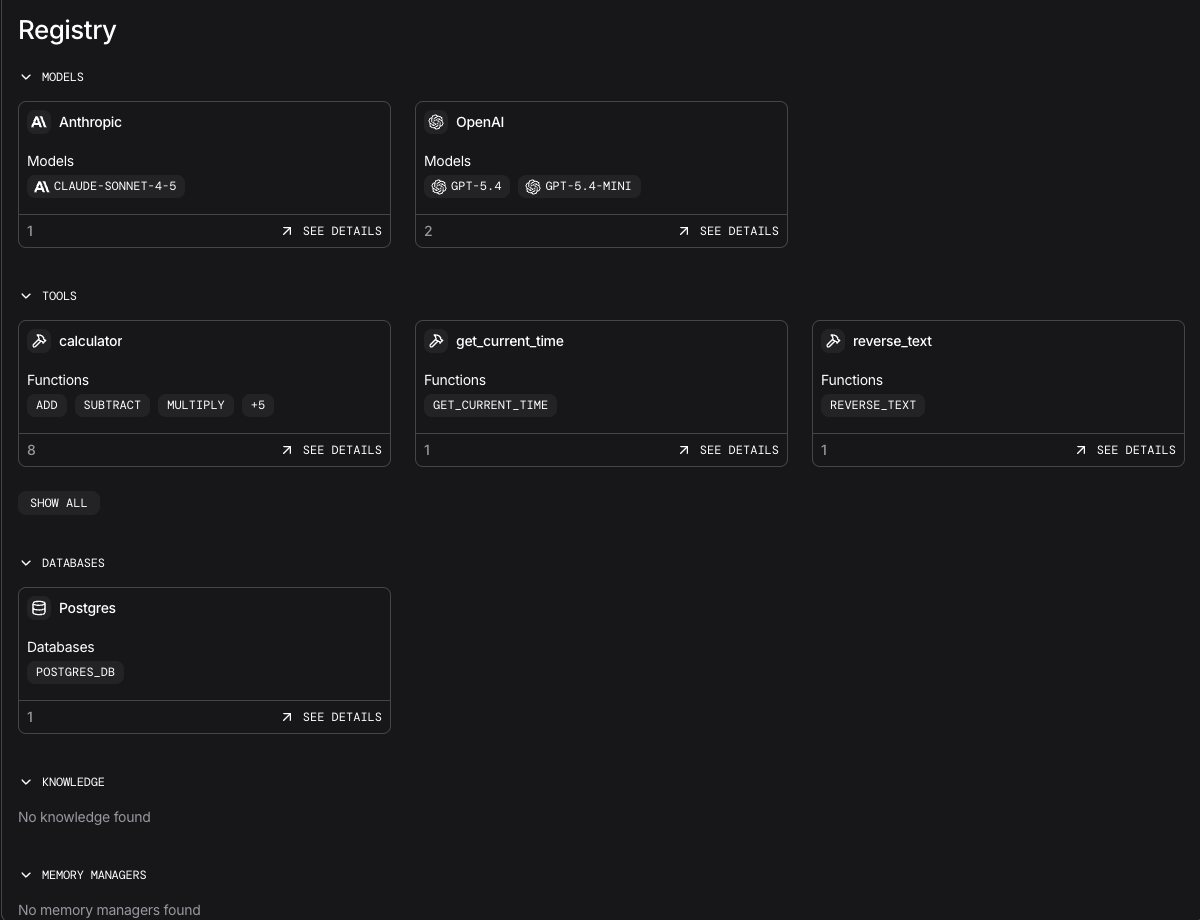
Run the Example
uv pip install -U "agno[os]" openai anthropic ddgs pgvector "psycopg[binary]"
export OPENAI_API_KEY="your_openai_api_key"
Set ANTHROPIC_API_KEY when running a component that selects Claude. The registered knowledge and vector stores are configured here; populate them before expecting search results.
Run PostgreSQL at postgresql+psycopg://ai:ai@localhost:5532/ai, or update the example URL. Enable the pgvector extension for the vector stores. See PostgreSQL setup.
Save the code as registry_app.py and run python registry_app.py.
Example of registry configuration:
from agno.db.postgres import PostgresDb
from agno.knowledge.knowledge import Knowledge
from agno.learn.machine import LearningMachine
from agno.memory import MemoryManager
from agno.models.anthropic import Claude
from agno.models.openai import OpenAIChat, OpenAIResponses
from agno.os import AgentOS
from agno.registry import Registry
from agno.session import SessionSummaryManager
from agno.tools.calculator import CalculatorTools
from agno.tools.websearch import WebSearchTools
from agno.vectordb.pgvector import PgVector
from agno.workflow import StepInput, Workflow
from pydantic import BaseModel

DB_URL = "postgresql+psycopg://ai:ai@localhost:5532/ai"

class InputSchema(BaseModel):
    input: str
    description: str

def custom_evaluator(step_input: StepInput) -> bool:
    return "urgent" in (step_input.input or "").lower()

db = PostgresDb(db_url=DB_URL, id="postgres_db")
user_memory_manager = MemoryManager(
    model=Claude(id="claude-sonnet-4-5"),
    db=db,
    additional_instructions="""
    IMPORTANT: Don't store any memories about the user's name. Just say "The User" instead of referencing the user's name.
    """,
)
concise_summary_manager = SessionSummaryManager(
    model=OpenAIResponses(id="gpt-5-mini"),
    session_summary_prompt=(
        "Summarize the conversation in 3-5 bullet points focused on decisions, "
        "open questions, and any follow-ups required."
    ),
    last_n_runs=10,
)
agent_knowledge = Knowledge(
    name="Agent Knowledge",
    description="Example knowledge base for agents",
    vector_db=PgVector(table_name="agent_knowledge_documents", db_url=DB_URL),
    contents_db=db,
)
shared_learning = LearningMachine(
    name="Shared Learning",
    db=db,
    user_memory=True,
)
triage_workflow = Workflow(
    id="triage-workflow",
    name="Triage Workflow",
    steps=[],
)

registry = Registry(
    name="My Registry",
    tools=[CalculatorTools(), WebSearchTools()],
    models=[OpenAIChat(id="gpt-5-mini"), Claude(id="claude-sonnet-4-5")],
    dbs=[db],
    vector_dbs=[PgVector(db_url=DB_URL, table_name="embeddings")],
    schemas=[InputSchema],
    functions=[custom_evaluator],
    memory_managers=[user_memory_manager],
    session_summary_managers=[concise_summary_manager],
    knowledge=[agent_knowledge],
    learning=[shared_learning],
    workflows=[triage_workflow],
)

agent_os = AgentOS(id="my-app", registry=registry, db=db)
app = agent_os.get_app()

if __name__ == "__main__":
    agent_os.serve(app="registry_app:app", port=7777)
Automatic discovery and available tools
AgentOS also discovers dependencies from its registered agents, teams, and workflows and adds them to the registry for reconstruction of stored components. Discovery does not automatically make a component's private tools available for building new components.
Tools explicitly passed to Registry(tools=[...]) are available for Studio composition. For StudioTools, allowed_tools can permit discovered tool names; denied_tools takes precedence over both explicit registration and the allowlist. This controls tool selection when building components, rather than replacing runtime authentication.
Registry API
The registry exposes a GET /registry endpoint through AgentOS with filtering and pagination.
Query Parameters
| Parameter | Type | Default | Description |
|---|---|---|---|
resource_type | string | None | Filter by type: tool, model, db, vector_db, schema, function, agent, team, workflow, knowledge, memory_manager, session_summary_manager, learning |
name | string | None | Partial name match (case-insensitive) |
page | int | 1 | Page number |
limit | int | 20 | Items per page (1-100) |
Response Metadata
Each component in the response includes type-specific metadata:
| Component Type | Metadata Fields |
|---|---|
| Tool | class_path, parameters, signature, toolkit functions |
| Model | provider, model_id |
| Database | db_id |
| Vector DB | collection, table_name |
| Schema | JSON schema definition |
| Function | signature, parameters |
| Knowledge | class_path, vector_db_class, contents_db_class, max_results, num_readers |
| Memory Manager | class_path, model_class, model_id, db_class, memory flags (add_memories, update_memories, delete_memories, clear_memories) |
| Session Summary Manager | class_path, model_class, model_id, last_n_runs, conversation_limit |
| Team | id, class_path |
| Agent | id, class_path |
| Workflow | id, class_path |
| Learning Machine | class_path, namespace, stores, model_id, db, knowledge, optional custom_stores |