Conversational Workflows
Route messages between workflow history and execution with WorkflowAgent.
Add a WorkflowAgent to give a workflow a multi-turn interface. For each message, the agent either answers from recent workflow history or runs the workflow for new work.
Quick Start
Create and activate a Python environment, then install the model and database dependencies:
uv pip install -U "agno[postgres,openai]"
export OPENAI_API_KEY="your_openai_api_key"
SQLite examples create a local file. The later PostgreSQL example requires a running database and a connection URL configured for your environment; installing its Python driver does not start a database.
from agno.db.sqlite import SqliteDb
from agno.models.openai import OpenAIResponses
from agno.workflow import Step, WorkflowAgent
from agno.workflow.types import StepInput, StepOutput
from agno.workflow.workflow import Workflow


def draft_response(step_input: StepInput) -> StepOutput:
    return StepOutput(content=f"Processed: {step_input.input}")


workflow_agent = WorkflowAgent(
    model=OpenAIResponses(id="gpt-5.2"),
    num_history_runs=4,
)

workflow = Workflow(
    name="support_workflow",
    description="Process support requests",
    agent=workflow_agent,
    steps=[Step(name="draft_response", executor=draft_response)],
    db=SqliteDb(db_file="workflow.db"),
)
WorkflowAgent is a restricted Agent configured for workflow orchestration. The workflow supplies its run_workflow tool.
Architecture
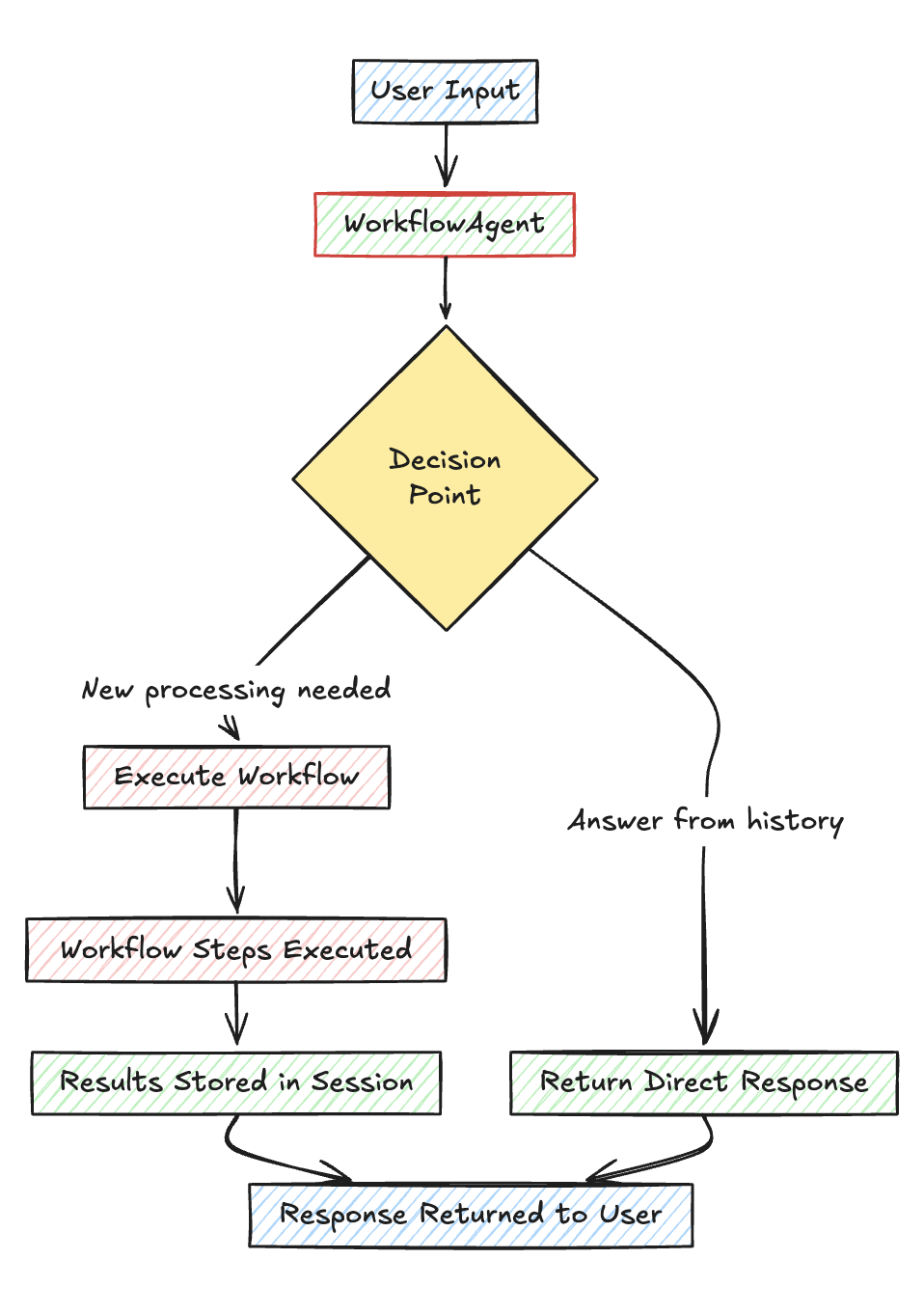
Workflow History for Conversational Workflows
The WorkflowAgent receives recent workflow runs from the current session. This context supports follow-up questions and comparisons across prior results.
| Parameter | Default | Description |
|---|---|---|
add_workflow_history | True | Add recent workflow runs to the agent context |
num_history_runs | 5 | Maximum number of recent runs to include |
Configure a database on the workflow to persist session history between process restarts. See Workflow history.
Instructions for the WorkflowAgent
The default instructions direct the agent to answer from history when possible and call run_workflow once for new work. Pass instructions to replace that decision policy. Workflow context is appended automatically unless the instructions already contain {workflow_context}.
workflow_agent = WorkflowAgent(
    model=OpenAIResponses(id="gpt-5.2"),
    num_history_runs=4,
    instructions="You are a helpful assistant that can answer questions and run workflows when new processing is needed.",
)
Usage Example
from agno.agent import Agent
from agno.db.postgres import PostgresDb
from agno.models.openai import OpenAIResponses
from agno.workflow import WorkflowAgent
from agno.workflow.types import StepInput
from agno.workflow.workflow import Workflow

db_url = "postgresql+psycopg://ai:ai@localhost:5532/ai"


story_writer = Agent(
    model=OpenAIResponses(id="gpt-5.2"),
    instructions="Write a 100-word story about the requested topic.",
)

story_formatter = Agent(
    model=OpenAIResponses(id="gpt-5.2"),
    instructions="Format the story into a prologue, body, and epilogue.",
)


def add_references(step_input: StepInput) -> str:
    previous_output = step_input.previous_step_content or ""
    return previous_output + "\n\nReferences: https://www.agno.com"


workflow_agent = WorkflowAgent(model=OpenAIResponses(id="gpt-5.2"), num_history_runs=4)

workflow = Workflow(
    name="Story Generation Workflow",
    description="A workflow that generates stories, formats them, and adds references",
    agent=workflow_agent,
    steps=[story_writer, story_formatter, add_references],
    db=PostgresDb(db_url),
)

# New topic
workflow.print_response(
    "Tell me a story about a dog named Rocky", stream=True
)

# Follow-up about a previous result
workflow.print_response(
    "What was Rocky's personality?", stream=True
)

# Another new topic
workflow.print_response(
    "Now tell me a story about a cat named Luna", stream=True
)

# Comparison across previous results
workflow.print_response(
    "Compare Rocky and Luna", stream=True
)